How CAs can use Zoffer Accountant for their clients
Your clients already WhatsApp you their bills. Most of the time, those photos sit in a chat until someone retypes them. Zoffer sits between that WhatsApp message and the client's books, so the bill arrives drafted and ready for you to check. You stay in control. Your clients do not change a thing.


Month-end today vs. month-end with Zoffer
Every CA firm we talk to describes the same loop: clients promise to send receipts, forget, send them in a batch at month-end, and then someone on your team retypes the lot. Here is what that looks like side by side.
The month-end scramble
Bills arrive already drafted
From a client's WhatsApp to their books
Four steps. Your client does the first one; Zoffer does the second; you do the third; the software does the fourth.
Client forwards a bill
Photo, PDF, voice note, or typed message. From their own phone, to Zoffer's WhatsApp number. They do not install anything.
Zoffer reads and drafts
The AI pulls out the vendor, amount, GST, and date within seconds. A draft entry appears under that client on your dashboard.
You verify the entry
Open the draft, check every field. Change the vendor, amount, category, or GST if the AI got it wrong. Approve only when it looks right.
Syncs to their books
The verified entry posts to the client's Zoho Books account. Tally is in early access; pre-register here.
If it has an amount on it, Zoffer can read it.
Your clients do not need training. They forward whatever the bill already is.
Photo of a bill
Printed, handwritten, or kachcha. If there is an amount, Zoffer reads it.
PDF invoice
Forwarded straight from the supplier's WhatsApp message.
Voice note
"Paid 2,400 for lab supplies." Just say it, no typing needed.
Plain text
Type "12,400 purchase from Sharma Traders" and it gets logged.
Every client on one screen.
You log in once. Every client organisation sits on a single screen with its draft bills and draft expenses waiting for you.
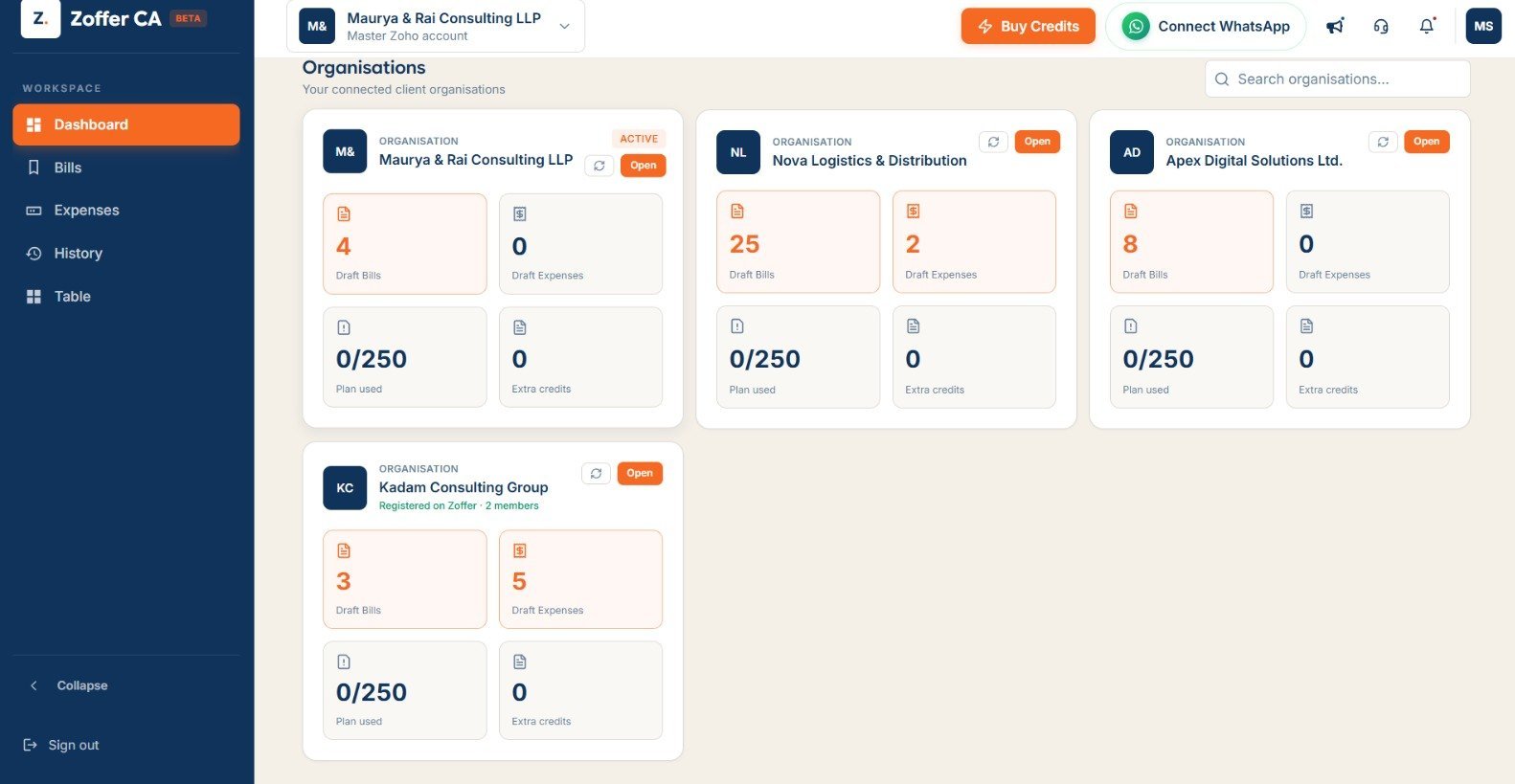
One card per client
Each organisation shows draft bills and draft expenses at a glance. You see what is waiting without opening anything.
Search and switch fast
Type a name in the search bar to find a client, or use the organisation switcher at the top to jump between them.
Verify, then post
Open a client's drafts, review each one, edit any field that the AI got wrong, and approve. The entry syncs only after you approve it.
Nothing slips through
Every entry waits in draft state until you act on it. Your client cannot accidentally post something to their own books.
Six things that get better the day you start.
You stop chasing clients for receipts
Clients forward bills the moment they get them, because "forward on WhatsApp" is easier than "collect in a folder and send next month." The receipt pile disappears because the workflow is instant and familiar. Bills trickle in throughout the month instead of arriving in a batch the night before your deadline.
Your staff reviews, not retypes
Instead of reading a bill photo and typing every field into Zoho Books by hand, your team opens a prefilled draft and checks whether the AI got it right. Reviewing a draft takes a fraction of the time that retyping takes.
You keep full control
Every entry waits for you. If Zoffer misreads a bill, you catch it in the draft and fix it. Change the vendor, amount, GST, or category. Nothing reaches the client's books until you approve. This is the same review process you already follow, just with less manual data entry before it.
Corrections carry forward
Fix a vendor name once and Zoffer remembers it for that vendor's future bills. The more entries you verify, the fewer corrections you need to make. Over time, the drafts get more accurate for each client.
Clients do not change their habits
Your clients already use WhatsApp. They do not install an app, create a login, or learn a new interface. They save Zoffer's number and forward bills to it. That is it. The barrier to getting them started is almost zero.
One plan, all clients, no per-client cost
The Founding Partner plan covers unlimited client onboarding. You pay nothing per client. The 3,000 credits a year are shared across all of them. If you need more, you top up.
How 3,000 credits cover a real practice
One bill processed uses one credit. The 3,000 credits a year are shared across all your clients. Here is what that looks like for a firm with five clients:
| Client | Type | Bills/month | Bills/year |
|---|---|---|---|
| Sharma Traders | Trader | 45 | 540 |
| Mehta Clinic | Clinic | 25 | 300 |
| Gupta Kirana | Kirana store | 60 | 720 |
| Bansal Textiles | Textiles | 35 | 420 |
| Patel Electronics | Retail | 20 | 240 |
| Total | 185 | 2,220 credits used |
2,220 out of 3,000 credits, with 780 left over. Need more in a busy year? Top up anytime.
Free while the beta runs. Worth ₹12,000/year.
The Founding Partner plan is how CA firms use Zoffer today. It is in beta, and the beta is free.
- ✓Unlimited client onboarding. Add as many client organisations as you have. No per-client subscription.
- ✓3,000 shared credits a year. One credit per bill, shared across all clients. Top up if you need more.
- ✓Multi-firm dashboard. Every client on one screen. Open a client to verify their entries.
- ✓Personal onboarding. The Zoffer team sets up your first clients with you.
- ✓Zoho Books today. Native two-way sync. Tally support is opening to pre-registered users.
Three steps to your first verified entry.
-
01
Message us on WhatsApp
Tell us you run a CA or accounting firm and want to join the beta. We will reply within a few hours and schedule your personal onboarding. Send the message now.
-
02
We set up your first clients together
During onboarding, we walk you through the dashboard and connect your first two or three clients. Each client saves Zoffer's WhatsApp number and sends a test bill.
-
03
Start verifying
Bills begin arriving as drafts on your dashboard. Review them, fix anything that is off, and approve. You are live.
Questions CAs ask us first.
The Founding Partner plan is worth ₹12,000 per year and is free while the CA beta runs. It includes unlimited client onboarding, 3,000 shared credits a year, personal onboarding, and the multi-firm dashboard.
No. Your clients use the WhatsApp they already have. They save Zoffer's number and forward their bills, receipts, PDFs, or voice notes. You review everything in the browser at accountant.zoffer.in.
No. Every entry Zoffer drafts waits for your review. You can edit any field (vendor, amount, GST, category) before you approve. Nothing reaches the books until you sign off.
One bill processed uses one credit. The 3,000 credits a year are shared across all your clients, so you do not pay a subscription per client. If you need more, you can top up.
Zoho Books today, with a two-way sync. Tally support is opening to pre-registered users. Register at zoffer.in/tally and the team will onboard you personally.
Yes. If you fix a vendor name or category on a draft, Zoffer remembers the correction for that vendor's future bills. The more you verify, the fewer corrections you need over time.
Data is encrypted in transit and at rest. Zoffer does not store WhatsApp messages beyond processing. Each client's books stay in their own accounting software account. Zoffer is a DPIIT-recognised startup. Full details are in the privacy policy.
Ready to stop chasing receipts?
we'll set up your first clients with you ✦